FR French
RU Russian
IT Italian
CN Chinese
ES Spanish
CS Czech
PL Polish
SA Arabic
JP Japanese
DE German
US English (US)
PT Portuguese
Back to homepage

Contact Us

If you still have questions or prefer to get help directly from an agent, please submit a request.
We’ll get back to you as soon as possible.

Please fill out the contact form below and we will reply as soon as possible.

  • Contact Us
Spanish
FR French
RU Russian
IT Italian
CN Chinese
ES Spanish
CS Czech
PL Polish
SA Arabic
JP Japanese
DE German
US English (US)
PT Portuguese
  • Home
  • Nube
  • Gestión del escáner

Transferir

Descubra una forma eficaz de transferir el escáner de una cuenta a otra.

Written by Qianqian JIang

Updated at January 8th, 2024

Contact Us

If you still have questions or prefer to get help directly from an agent, please submit a request.
We’ll get back to you as soon as possible.

Please fill out the contact form below and we will reply as soon as possible.

  • Empezar
    Descarga de software Catalogar
  • Nube
    Gestión del escáner Vista previa y uso compartido del caso Almacenamiento de casos
  • Training Videos
    QUICK START SOFTWARE FUNCTIONS CASE SCAN PANDA APP MAINTENANCE & CLEANING
  • tutorial de pandas
    característica del software Escaneando vídeo
  • Solución de problemas
  • Preguntas más frecuentes
+ More

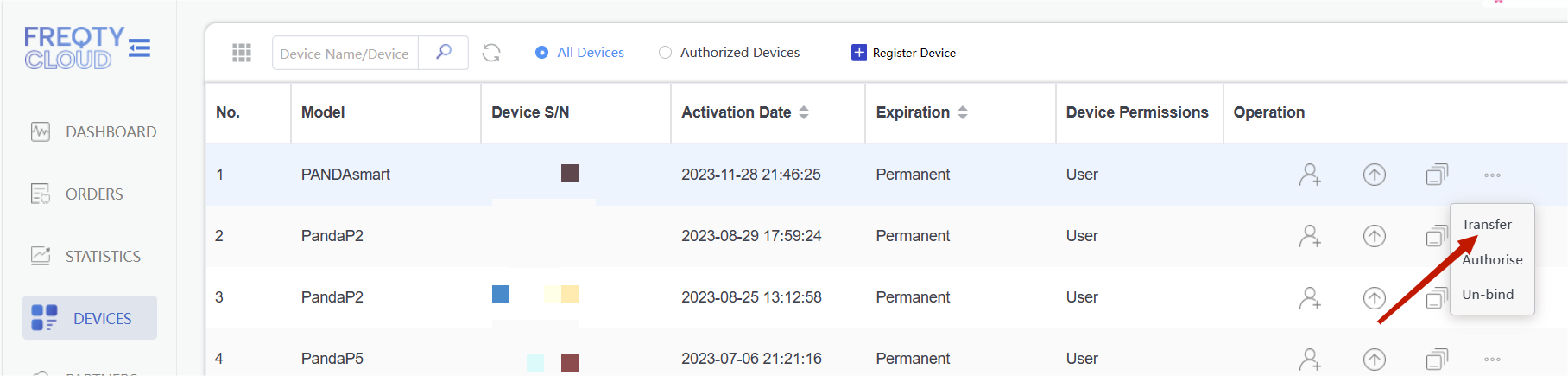
Esto significa que este dispositivo se puede transferir a otro usuario. Una vez que transfieras el dispositivo, no tendrás derecho a usarlo.

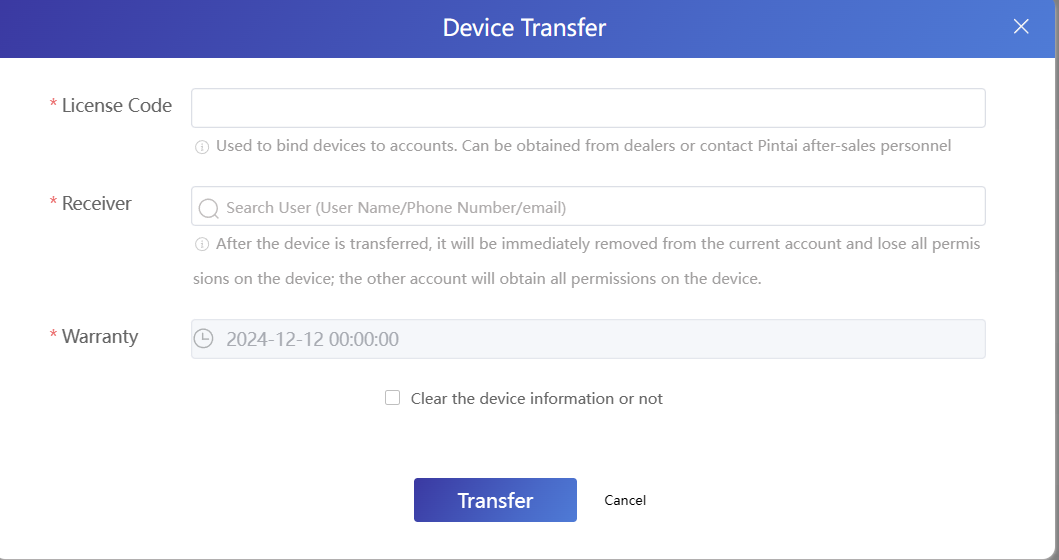
Póngase en contacto con los distribuidores o con el servicio posventa de Panda para obtener el código de licencia y busque el destinatario por correo electrónico o nombre de usuario.
Was this article helpful?

Yes
No
Give feedback about this article

Related Articles

  • Activar el escáner
  • Agregar usuario
  • Transferencia de datos
  • Renovar-cifrar
  • Autorizar

Copyright 2026 – Panda Scanner.

Knowledge Base Software by Helpjuice

Expand