FR French
RU Russian
IT Italian
ES Spanish
CN Chinese
PL Polish
CS Czech
JP Japanese
DE German
US English (US)
SA Arabic
PT Portuguese
Back to homepage

Contact Us

If you still have questions or prefer to get help directly from an agent, please submit a request.
We’ll get back to you as soon as possible.

Please fill out the contact form below and we will reply as soon as possible.

  • Contact Us
Italian
FR French
RU Russian
IT Italian
ES Spanish
CN Chinese
PL Polish
CS Czech
JP Japanese
DE German
US English (US)
SA Arabic
PT Portuguese
  • Home
  • Iniziare

Installazione del software

Questo articolo ti aiuterà a installare facilmente il software.

Written by Yutong Xi

Updated at September 2nd, 2026

Contact Us

If you still have questions or prefer to get help directly from an agent, please submit a request.
We’ll get back to you as soon as possible.

Please fill out the contact form below and we will reply as soon as possible.

  • Iniziare
    Download del software Catalogare
  • Nuvola
    Gestione scanner Anteprima e condivisione del caso Custodia della custodia
  • Training Videos
    QUICK START SOFTWARE FUNCTIONS CASE SCAN PANDA APP MAINTENANCE & CLEANING PandaCenter V2.0
  • Tutorial sul panda
    Funzionalità del software Scansione video V1 PandaCenter feature V2 PandaCenter features
  • Risoluzione dei problemi
  • FAQ
+ More

Passaggio 1: Scarica il software dal web o dall'unità USB.

Passaggio 2: installare il software.

(1) Aprire il file e fare doppio clic su "installer" e quindi installare

(2) Fare clic su "Consenti" e "Impostazione personalizzata" per installare "Pandacenter e Panda"
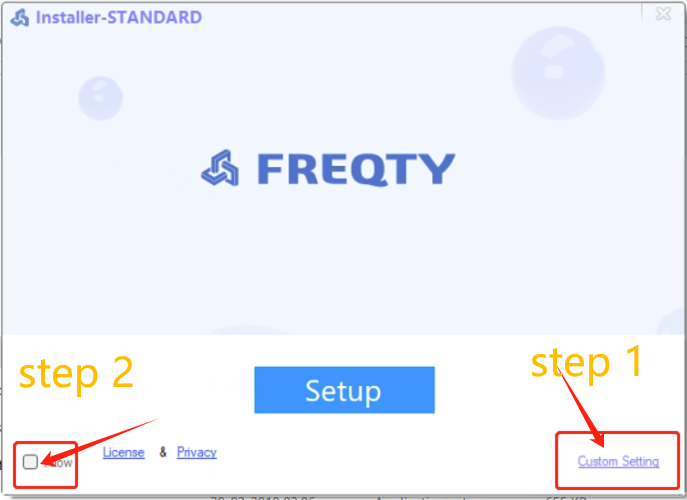
***Nota: il PC potrebbe riavviarsi automaticamente dopo aver cliccato su "Installer". Dopo il riavvio del PC, individuare il file e cliccare nuovamente su "Installer".

Passaggio 3: imposta il laptop e correggi gli altri cliccando sullo "strumento Rileva" finché tutto non è a posto.

Passaggio 4: riavviare il laptop

installazione programma software setup

Was this article helpful?

Yes
No
Give feedback about this article

Related Articles

  • Scarica il software
  • Come attivare uno scanner

Copyright 2026 – Panda Scanner.

Knowledge Base Software by Helpjuice

Expand