FR French
RU Russian
IT Italian
CN Chinese
ES Spanish
CS Czech
PL Polish
SA Arabic
JP Japanese
DE German
US English (US)
PT Portuguese
Back to homepage

Contact Us

If you still have questions or prefer to get help directly from an agent, please submit a request.
We’ll get back to you as soon as possible.

Please fill out the contact form below and we will reply as soon as possible.

  • Contact Us
Italian
FR French
RU Russian
IT Italian
CN Chinese
ES Spanish
CS Czech
PL Polish
SA Arabic
JP Japanese
DE German
US English (US)
PT Portuguese
  • Home
  • Tutorial sul panda
  • Funzionalità del software

Misurazione

Written by Zhou Amy

Updated at January 5th, 2024

Contact Us

If you still have questions or prefer to get help directly from an agent, please submit a request.
We’ll get back to you as soon as possible.

Please fill out the contact form below and we will reply as soon as possible.

  • Iniziare
    Download del software Catalogare
  • Nuvola
    Gestione scanner Anteprima e condivisione del caso Custodia della custodia
  • Training Videos
    QUICK START SOFTWARE FUNCTIONS CASE SCAN PANDA APP MAINTENANCE & CLEANING
  • Tutorial sul panda
    Funzionalità del software Scansione video
  • Risoluzione dei problemi
  • FAQ
+ More

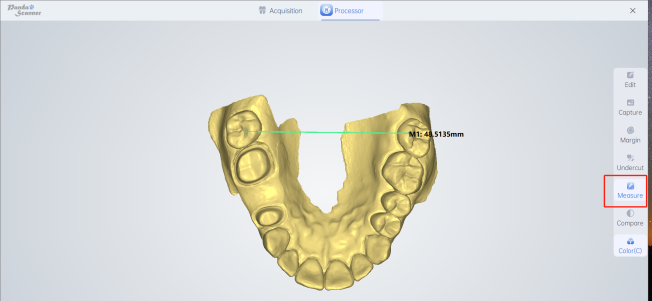
Introduzione: Misurare la distanza tra due punti qualsiasi per ottenere una figura specifica.

Utilizzo: Per la misurazione ortodontica della spaziatura dei denti e della larghezza dell'arcata.

Metodo: fare clic su un punto qualsiasi, quindi fare clic su un altro punto per ottenere la cifra misurata. L'operazione specifica può fare riferimento al seguente video.
Il tuo browser non supporta i video HTML5.

Was this article helpful?

Yes
No
Give feedback about this article

Related Articles

  • Eliminare
  • Spazzola
  • Poligono
  • Disfare
  • Pulito

Copyright 2026 – Panda Scanner.

Knowledge Base Software by Helpjuice

Expand