FR French
RU Russian
IT Italian
CN Chinese
ES Spanish
CS Czech
PL Polish
SA Arabic
JP Japanese
DE German
US English (US)
PT Portuguese
Back to homepage

Contact Us

If you still have questions or prefer to get help directly from an agent, please submit a request.
We’ll get back to you as soon as possible.

Please fill out the contact form below and we will reply as soon as possible.

  • Contact Us
German
FR French
RU Russian
IT Italian
CN Chinese
ES Spanish
CS Czech
PL Polish
SA Arabic
JP Japanese
DE German
US English (US)
PT Portuguese
  • Home
  • Fehlerbehebung

Unqualifizierte Falldaten

Written by Zhou Amy

Updated at January 5th, 2024

Contact Us

If you still have questions or prefer to get help directly from an agent, please submit a request.
We’ll get back to you as soon as possible.

Please fill out the contact form below and we will reply as soon as possible.

  • Loslegen
    Herunterladen der Software Katalog
  • Wolke
    Scannerverwaltung Fallvorschau und Freigabe Kofferaufbewahrung
  • Training Videos
    QUICK START SOFTWARE FUNCTIONS CASE SCAN PANDA APP MAINTENANCE & CLEANING
  • Panda-Tutorial
    Softwarefunktion Video scannen
  • Fehlerbehebung
  • FAQ
+ More

Nachdem der Fall bearbeitet wurde, müssen Sie die Daten noch einmal überprüfen, bevor Sie sie an das Labor senden.

Es gibt einige unqualifizierte Fälle. Bitte vermeiden Sie es, solche Daten zu erhalten.

Nach dem Scannen müssen Sie die Daten zur Überprüfung in die Gipsfarbe umwandeln ( klicken Sie auf die Schaltfläche „Farbe“ oder drücken Sie die Taste „C“ oder drücken Sie die Taste zweimal).
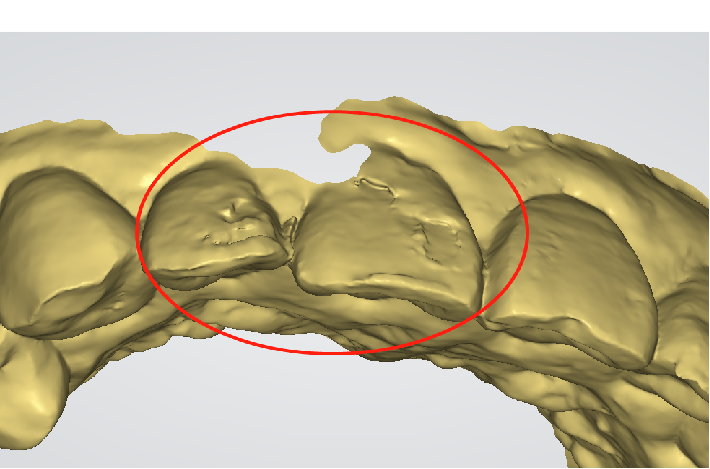
Wellung
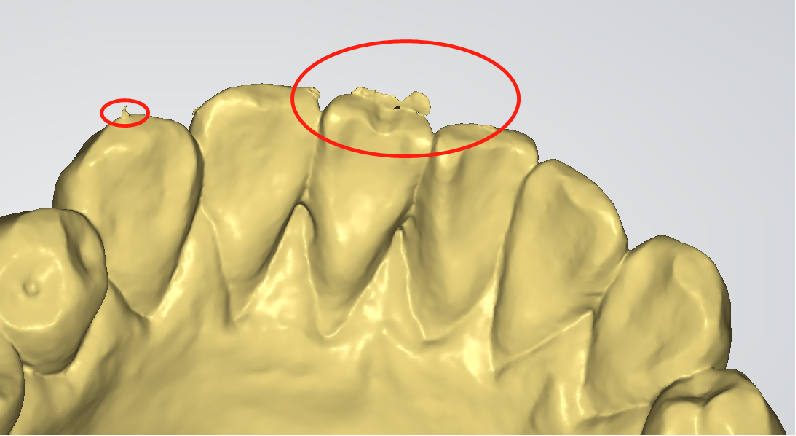
Überschüssige Daten zum Zahn
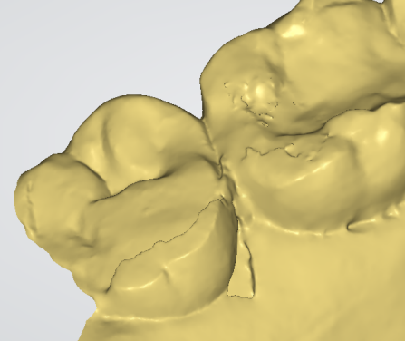
Riss
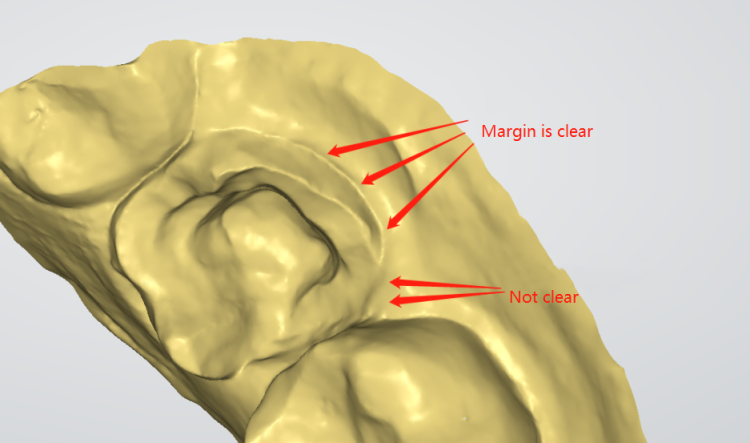
Was this article helpful?

Yes
No
Give feedback about this article

Related Articles

  • Die Geräteautorisierung ist nicht vorhanden
  • Gerät nicht autorisiert
  • Kalibrierung fehlgeschlagen
  • So überprüfen Sie die technischen Daten Ihres Laptops.
  • Farbkalibrierung

Copyright 2026 – Panda Scanner.

Knowledge Base Software by Helpjuice

Expand